Page summary
SMS & WhatsApp Opt-in per Trip
This functionality allows operators to collect explicit customer consent per trip for receiving communications via SMS and/or WhatsApp during the sales flow (Back Office and Websales).
Consent is trip-specific, meaning a customer’s preference applies only to the trip being purchased and does not carry over to future bookings.
This ensures compliance, clear customer choice, and precise targeting for operational notifications (e.g., manifest notifications).
This feature applies to:
- Back Office sales flow
- Websales flow
- Manifest notifications (SMS / WhatsApp)
- Administration configuration
Administration Configuration
To configure notifications, navigate to Administration -> Notifications -> SMS and WhatsApp
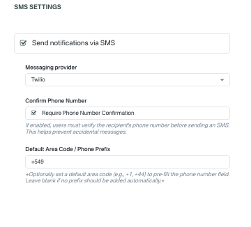
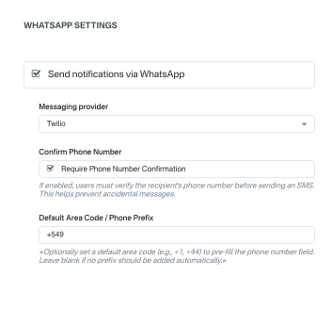
Provider integrations
SMS can use Twilio or Salesforce as the messaging provider. At least one provider must be enabled and configured for SMS to be available.
WhatsApp uses Twilio only. Twilio must be enabled and configured (and not using the default Twilio account) for WhatsApp to be available.
Twilio Integration — enable and configure Twilio (required for WhatsApp; optional for SMS if using Salesforce).
To use SMS or WhatsApp notifications, at least one provider (Twilio and/or Salesforce) must be enabled and properly configured in its respective settings page (Administration -> Notifications -> Twilio Settings or Salesforce Settings).
When no provider is available
- If no SMS provider is enabled and configured, the Send SMS notifications checkbox and SMS provider dropdown are disabled, and SMS cannot be turned on.
- If no WhatsApp provider is enabled and configured, the Send WhatsApp notifications checkbox and WhatsApp provider dropdown are disabled, and WhatsApp cannot be turned on.
Save / Submit behavior When you click Save on the SMS and WhatsApp settings page:
- Only Twilio account settings are sent to the Twilio API when Twilio is enabled (turned on in Twilio Settings). If Twilio is not enabled, the Twilio update API is not called.
- Only Salesforce account settings are sent to the Salesforce API when Salesforce is enabled (turned on in Salesforce Settings). If Salesforce is not enabled, the Salesforce update API is not called.
- The page always saves the form data; disabled integrations are simply not pushed to their external provider.
Configurable options
- Enable / disable SMS notifications
- Enable / disable WhatsApp notifications
- Select messaging provider for SMS (Twilio or Salesforce)
- Select messaging provider for WhatsApp (Twilio only)
- Require phone number confirmation
- Set default phone prefix (area code)
Define default opt in state:
- SMS checked by default
- WhatsApp checked by default
- Both
- Neither
These settings directly control what appears in the sales flow.
Sales Flow Behavior
At the final page of the sales flow, the system must evaluate the operator’s configuration:
- If SMS notifications are enabled -> display an SMS opt in checkbox
- If WhatsApp notifications are enabled -> display a WhatsApp opt in checkbox
- If both are enabled -> display both checkboxes
- If neither is enabled -> no communication opt in options are shown
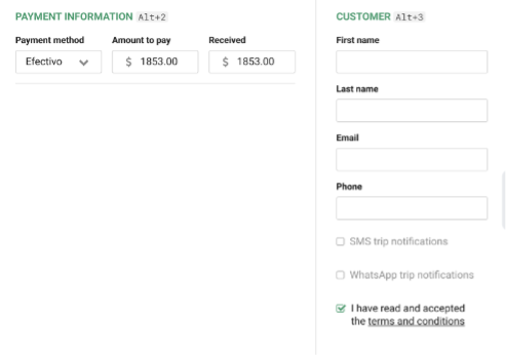
Each checkbox represents the customer’s consent for that specific trip.
Phone Number Confirmation
If SMS or WhatsApp is enabled and requires phone number confirmation:
- A second phone number confirmation input must be displayed
- The customer must enter the phone number twice
- Both phone inputs must match exactly
Considerations - If values do not match -> block completion and show validation error
- If values match -> allow checkout completion
- This applies independently to SMS and WhatsApp based on configuration.
Validation rules
Notification Behavior (Manifest Notifications)
When an operator sends a notification using the Manifest Notifications feature:
- Only customers who explicitly opted in for that trip will receive the message
- Customers without opt in must not receive any SMS or WhatsApp message