Page summary
- Overview
- Control Class Hierarchy (Nestings)
- Tree Structure
- Inheritance
- Single-Characteristic Variation
- Sibling Consistency
- Root Properties
- Purchase Characteristics
- Matching Types
- Supported Characteristics
- Authorizations
- Integration with Revenue Management Systems
- How Authorizations Work
- Storage
- Matching
- Webhooks
- Control Class Selection for a Purchase
- Step 1: Nesting Selection
- Step 2: Finding the Deepest Matching Class
- Step 3: Availability Evaluation
- Step 4: Class Selection
- Most Specific Mode
- Independent Availability by Seat Class
- Pricing
- Base Price
- Price Modifier
- Final Price Calculation
- Price Modifier Application Order
- Nesting assignment to Schedules
- Compounding Price Modifiers
- Requirements
- How compounding works
- Example
- Account Settings
- Naming Policy
- Child Selection Criteria
- Control Classes User Interface
- Settings
- List View
- Create and Edit
- View Authorizations
- Sales Flow behavior
- Stop selling when availability reaches zero
Control Classes Nestings
Overview
Control Classes are a pricing and inventory management feature in Betterez that allows operators to define hierarchical pricing levels for ticket sales. Through a tree-based structure of classes, operators can create fine-grained pricing rules that respond to purchase characteristics such as sales channel, fare type, seat class, brand, and how far in advance a ticket is purchased.
Control Classes integrate (optionally) with an external Revenue Management System (RMS) which governs how many tickets can be sold at each pricing level for each trip segment. This enables dynamic revenue optimization: the RMS decides how many seats are available at each price tier, and Betterez enforces those limits during the purchase flow.
In summary, a Control Class defines:
- When it applies: a set of purchase characteristics that must match the current transaction.
- How it modifies pricing: an optional price adjustment (percentage or fixed amount) on top of the base ticket price.
- How many tickets can be sold under it: governed by authorizations received from the RMS.
Control Class Hierarchy (Nestings)
Tree Structure
Control Classes are organized into trees, referred to as Nestings. Each nesting represents a complete set of pricing tiers for one or more products.
- Every nesting has a single Root class at the top.
- The Root has no parent.
- Every other class in the nesting has exactly one parent and may have zero or more children.
- A nesting can be as shallow as a single Root with direct children, or any amount of levels deep.
Inheritance
Each class inherits all the purchase characteristics of its parent. This means a child class is always at least as specific as its parent — it matches the same conditions as the parent, plus potentially one more.
Single-Characteristic Variation
A child class may vary from its parent on exactly one additional characteristic. For example, if a parent class matches a specific product and brand, a child may further narrow the match by also specifying a sales channel.
Sibling Consistency
All siblings (children of the same parent) must vary on the same characteristic. For example, if one child of a parent varies by sales channel, all siblings of that child must also vary by sales channel. Each sibling must specify a unique value for that characteristic, ensuring there is no ambiguity when selecting among them.
Root Properties
The Root class defines the product association for the nesting — one or more products that the nesting applies to. It may also define an optional Nesting Name display name. When the account's Child Selection Criteria is Sales Authorizations Availability, a root might optionally enable Independent Availability by Seat Class. When the account's Child Selection Criteria is Most Specific, a root might optionally enable Compounding Price Modifiers.
Purchase Characteristics
Each Control Class may declare a set of purchase characteristics. During a ticket purchase, the system compares these characteristics against the current transaction context to determine which classes apply.
Matching Types
Most characteristics can be configured with one of three matching types:
One Of
The purchase value must be one of the values specified in the class. For example, a class configured with Channel = One Of [Websales, Agency Websales] will match only purchases made through those two channels.
Any
The class matches regardless of the purchase value for this characteristic. This is effectively a wildcard — the characteristic is declared but will always match.
All Except
The class matches any purchase value except the ones listed. For example, BRAND = All Except [BrandExample] will match purchases from any brand other than BrandExample.
Supported Characteristics
Product(s)
The product(s) associated with the trip. Required on Root classes. Only the One Of match type is supported, and one or more products may be selected. Only products using Journey Pricing or Market Pricing are supported. The selected products also limit which schedules can be assigned to the nesting. Child classes inherit the Root's products and cannot change them.
Brand
The brand under which the trip operates.
Operating Company
The company operating the trip.
Amenity Group
The amenity group(s) associated with the trip's bus or vehicle. A trip may have multiple amenity groups; a match occurs if any of them satisfies the condition.
Fare
The fare type selected by the purchaser.
Fare Class
The fare class (e.g., economy, business) selected for the purchase.
Seat Class
The seat class (e.g., standard, premium) selected for the purchase.
Channel
The sales channel through which the purchase is made. Supported values: Backoffice, Websales, Agency Backoffice, Agency Websales.
Advance Purchase
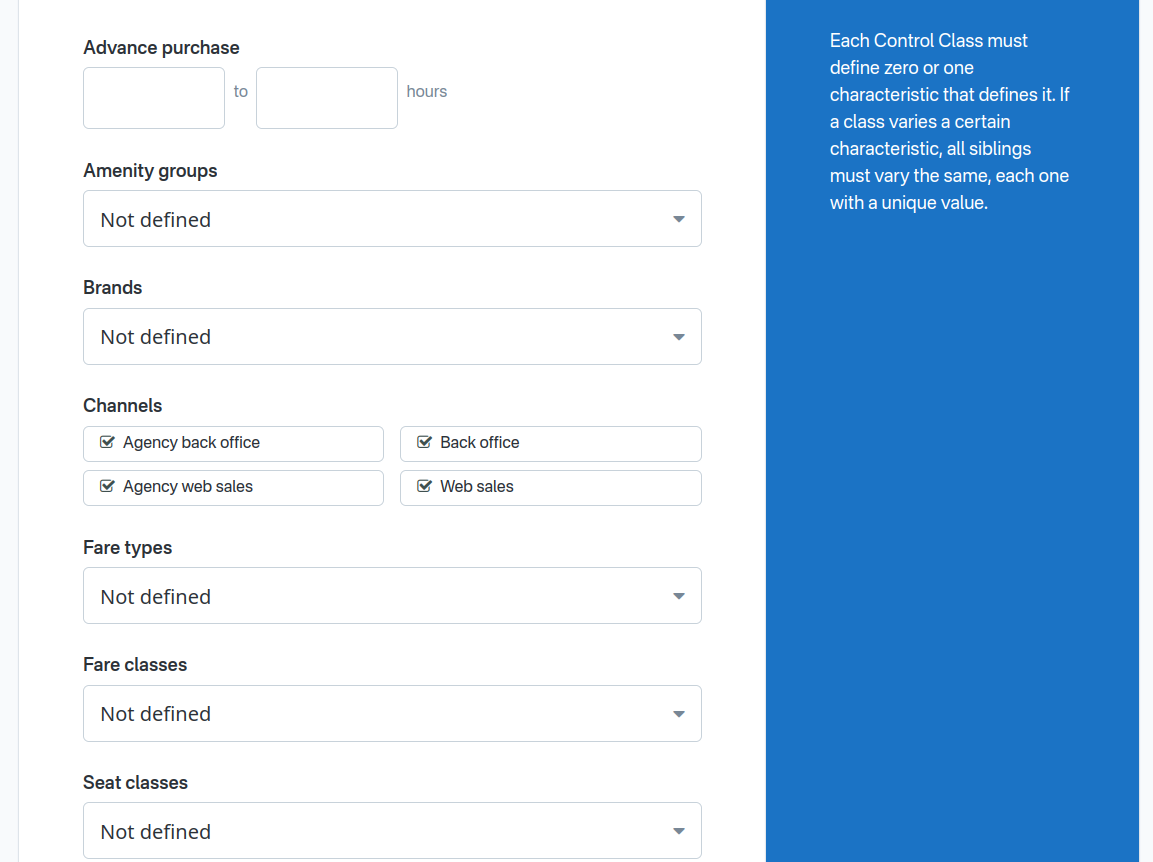
How many hours before departure the ticket is being purchased. Configured as a range with a minimum and maximum number of hours. A purchase matches if the hours remaining until departure fall within the specified range. Unlike other characteristics, this uses a numeric range rather than a list-based match type. Sibling classes using Advance Purchase must have non-overlapping ranges.
Load Factor
Configured as a range with a minimum and maximum percentage, the control class will only match purchases where the highest load factor of all vehicles on all legs of the journey manifest is currently inside that range. Unlike other characteristics, this uses a numeric range rather than a list-based match type. Sibling classes using Load Factor must have non-overlapping ranges.
Authorizations
Integration with Revenue Management Systems
Control Classes are designed to work with an external Revenue Management System (RMS) that governs how many tickets may be sold at each pricing level. The only currently supported RMS integration is Appia.
How Authorizations Work
The Appia RMS sends authorizations to Betterez via the POST /rms/appia/authorizations endpoint. An authorization tells Betterez how many tickets may be sold for a specific Control Class on a specific trip.
Each authorization specifies:
- Schedule and Date: identifies the specific trip (manifest).
- Origin and Destination: identifies the leg or segment within that trip (an O&D pair).
- Control Class: identified by the class name/code.
- Authorized Quantity: the maximum number of tickets that may be sold under this class for this O&D pair.
Storage
Authorizations are stored on the Manifest — the per-trip, per-date record in Betterez. When Appia sends new authorizations for a manifest, the entire set of authorizations for that manifest is replaced with the new data.
Matching
Appia identifies Control Classes by their name (referred to as the class "code" in Appia). Betterez resolves the name to the corresponding Control Class record when processing incoming authorizations. If a class name sent by Appia does not match any existing Control Class, the authorization is rejected with an error.
Webhooks
When authorizations are successfully updated, Betterez emits a controlclasses.authorizations.updated webhook event.
Control Class Selection for a Purchase
During a ticket purchase, Betterez determines which Control Class applies to each trip segment. This selection determines both the pricing and availability for the requested tickets.
Step 1: Nesting Selection
A Control Class Nesting is selected for each trip segment when the segment's schedule has a Control Class Root assigned. If the schedule has no assigned Root, no Control Class logic applies to that segment, and standard pricing is used.
Step 2: Finding the Deepest Matching Class
Within the selected Nesting, the system traverses from the Root downward, at each level selecting the child whose characteristics best match the current purchase context (product, channel, fare, seat class, brand, operating company, amenity group, and advance purchase hours).
Among siblings, the system prefers the most specific match:
- A class matching with One Of (exact value match) is preferred over one matching with All Except.
- A class matching with All Except is preferred over one matching with Any (wildcard).
The traversal continues until no further matching children are found. The result is a path from the Root to the deepest matching class.
Step 3: Availability Evaluation
When the account's Child Selection Criteria is set to Sales Authorizations Availability, the system evaluates availability for each class along the path.
Availability for a Control Class on a given O&D segment is calculated as the minimum between the 'physical availability' and the 'logical availability', calculated as:
Availability = min( Segment Capacity - Segment Occupancy, Authorized Sales - O&D Independent Bookings )
Where:
- Segment Capacity is the physical seating capacity of the bus for that O&D pair, accounting for manifest capacity exceptions.
- Segment Occupancy is already-occupied seats from the segment itself, plus any tickets that overlap with the segment.
- Authorized Sales is the Appia authorization quantity for the Control Class on that O&D pair, stored on the Manifest.
- O&D Independent Bookings is the number of tickets already sold under the same Control Class Root for that O&D pair, including any pending bookings. Only tickets strictly from the Origin to the Destination are counted, not overlapping tickets with a different O&D. When the Root has Independent Availability by Seat Class enabled, only tickets whose seat class matches the evaluated class's Seat Class characteristic (match type One Of) are counted.
Additionally, a parent constraint is enforced: a child class can never have more availability than its parent. If the calculated availability for a child exceeds its parent's availability, the child's availability is capped to the parent's value.
Step 4: Class Selection
The system evaluates the path from the deepest class to the Root. The first class with enough availability for the number of tickets being purchased is selected.
If no class along the path has sufficient availability, the Root class is used. The Root is guaranteed to have sufficient availability because the RMS sets the Root's authorization to match the actual physical capacity of the bus.
Most Specific Mode
When the account's Child Selection Criteria is set to Most Specific, availability is not evaluated. The deepest matching class from Step 2 is selected directly.
Independent Availability by Seat Class
When the account's Child Selection Criteria is Sales Authorizations Availability, the Root may optionally enable Independent Availability by Seat Class. This subdivides the nesting into independent sub-nestings, one per one or more seat classes, each with its own independent availability calculation.
By default, O&D Independent Bookings (see Step 3: Availability Evaluation) count every ticket sold under the same Root for a given O&D pair, regardless of seat class. With Independent Availability by Seat Class enabled, bookings are counted separately per seat class: only tickets sold with a seat class that matches a class's Seat Class characteristic are included in that class's O&D Independent Bookings.
This is useful when a single bus serves multiple cabins or seat classes that should each have their own RMS authorization pool — for example, a premium cabin and a standard cabin on the same trip.
Requirements
- Only available on Root classes.
- Only available when the account's Child Selection Criteria is Sales Authorizations Availability.
- The only supported value is
seatClassId. - Direct children of the Root must vary on Seat Class with match type One Of and at least one seat class value. Each direct child defines one sub-nesting.
- Deeper levels of the tree inherit the seat class from their ancestor sub-nesting and may vary on additional characteristics as usual.
- Independent Availability by Seat Class cannot be enabled on a Root that already has direct children unless all of those children already vary on Seat Class with match type One Of and at least one value.
Example
Consider a nesting with Root RM0 and Independent Availability by Seat Class enabled. Two direct children define the sub-nestings:
CabinA— Seat Class = One Of [Premium]CabinB— Seat Class = One Of [Standard]
Each cabin has its own deeper pricing levels (e.g., RM1-A / RM2-A under CabinA, RM1-B / RM2-B under CabinB).
If one ticket is sold from A→B in the Premium cabin:
- Availability for classes under
CabinAon A→B is reduced by 1. - Availability for classes under
CabinBon A→B is not affected.
Similarly, a booking on B→C in the Standard cabin only reduces availability for classes under CabinB on B→C, not for CabinA.
Pricing
Normally, only the selected control class price modifier is applied.
When the nesting Root has Compounding Price Modifiers enabled, every price modifier along the path from the Root to the selected class is applied in sequence instead of only the selected class's modifier.
Base Price
The Root Control Class does not have its own price, Control Classes do not define a price. Instead, the base ticket price is determined by the existing Betterez pricing mechanisms — Journey Pricing or Market Pricing — during an earlier step of the purchase flow. The specific pricing mechanism depends on the product configuration.
Price Modifier
Each non-Root Control Class may define a price modifier that adjusts the base price. A modifier can be:
Percentage (%)
Adds or subtracts a percentage of the base price. For example, +10% increases the base price by 10%, while -15% decreases it by 15%.
Percentage modifiers are subject to the account's rounding policy.
Fixed Amount ($)
Adds or subtracts a fixed monetary amount from the base price. For example, +5.00 adds $5 to the base price, while -3.50 subtracts $3.50.
Modifiers can be positive (surcharge) or negative (discount).
Final Price Calculation
The final ticket price for a purchase is:
Final Price = Base Price + Modifier
Where:
- Base Price is determined by Journey Pricing or Market Pricing for the trip.
- Modifier is the price adjustment from the selected Control Class. If the selected class is the Root (which has no modifier), the base price is unchanged.
Price Modifier Application Order
For Journey Pricing, the selected Control Class Price Modifier is applied at the very end, after all other adjustments have been applied.
For Market Pricing, the selected Control Class Price Modifier is applied BEFORE the Market Pricing Modifier.
Nesting assignment to Schedules
A Nesting can be assigned to a Schedule directly, in the Edit Schedule page.
A Route can define a Default Control Class, that will be assigned to all the Route Schedules when the default is configured, and after that it will apply to newly created Schedules in that Route.
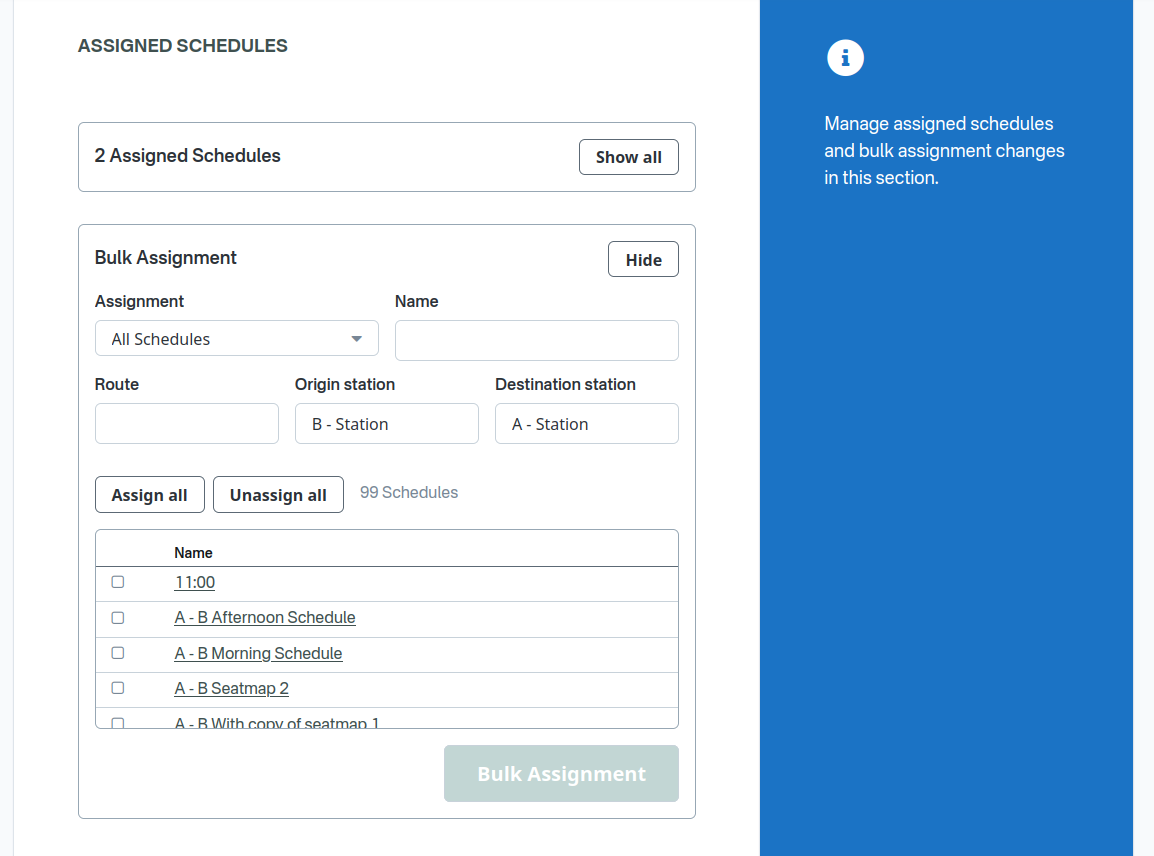
A Nesting can be bulk assigned and unassigned from the Nesting edit page, editing the assignment of many schedules at the same time.
Compounding Price Modifiers
By default, only the price modifier of the selected (most specific) Control Class is applied to the base price. Compounding Price Modifiers changes that behavior so that every price modifier along the path from the Root to the selected class is applied, in order from Root toward the leaf.
Requirements
- Only available to be enabled on Root classes, applies to the whole nesting.
- Only available when the account's Child Selection Criteria is Most Specific.
Class selection is unchanged: the system still selects the most specific matching class. Compounding only changes how price modifiers are applied after that selection.
How compounding works
When Compounding Price Modifiers is enabled on the Root:
- The system selects the most specific matching class as usual.
- It walks the path from the Root down to that selected class.
- Every class on that path that has a price modifier contributes, in order (Root → … → selected class).
- Classes on the path without a price modifier are skipped.
- Modifiers are applied sequentially to a running price:
- A fixed ($) modifier adds or subtracts its amount from the current price.
- A percentage (%) modifier is calculated against the current price after previous path modifiers, not against the original base price.
- Percentage modifiers remain subject to the account's rounding policy at each step.
When Compounding Price Modifiers is disabled or omitted, only the selected class's own price modifier is applied (same behavior as Final Price Calculation).
Example
Consider a nesting with Compounding Price Modifiers enabled, base price $10.00, and this matching path:
| Class | Price modifier |
|---|---|
Root (RM0) |
(none) |
Mid (RM1) |
+$1.00 |
Deeper (RM1a) |
+10% |
Leaf (RM2) — selected |
+$2.00 |
Compounding calculation (Root is skipped because it has no modifier):
- $10.00 + $1.00 = $11.00
- $11.00 + 10% of $11.00 = $12.10
- $12.10 + $2.00 = $14.10
If the mid class had no price modifier, that step would be skipped: $10.00 + 10% of $10.00 + $2.00 = $13.00.
With compounding disabled, only the leaf modifier would apply: $10.00 + $2.00 = $12.00.
Account Settings
Control Classes Nestings have two account-level settings that apply to all nestings in the account. They are configured on the Settings page in the Control Classes section of the backoffice (Pricing → Control Classes → Settings).
These settings are stored in the account preferences and managed through the GET /accounts/control-classes-settings and PUT /accounts/control-classes-settings API endpoints.
Naming Policy
Defines how Control Class names must be unique when creating or editing classes. Options:
- Unique by nesting (default): Class names must be unique within each nesting — among the Root and all classes that belong to the same nesting. The same name may be reused in different nestings.
- Unique by account: Class names must be unique across the entire account, including all nestings.
- Allow duplicates: Non-Root classes may share the same name, including across nestings. Root class names must still be unique across the account. This policy cannot be used when the Child Selection Criteria is Sales Authorizations Availability.
Root class names are always required to be unique across the account regardless of the naming policy. This ensures Appia RMS authorizations can reliably identify classes by name (see Matching).
Child Selection Criteria
Determines how the system selects among matching classes during a purchase. This setting applies to all nestings in the account. Options:
- Most Specific (default): the system selects the deepest class in the nesting whose characteristics match the purchase.
- Sales Authorizations Availability: the system selects the deepest matching class that also has enough availability according to RMS authorizations (see Control Class Selection).
Control Classes User Interface
Settings
The settings page allows configuring the account-level Naming Policy and Child Selection Criteria described above.
List View
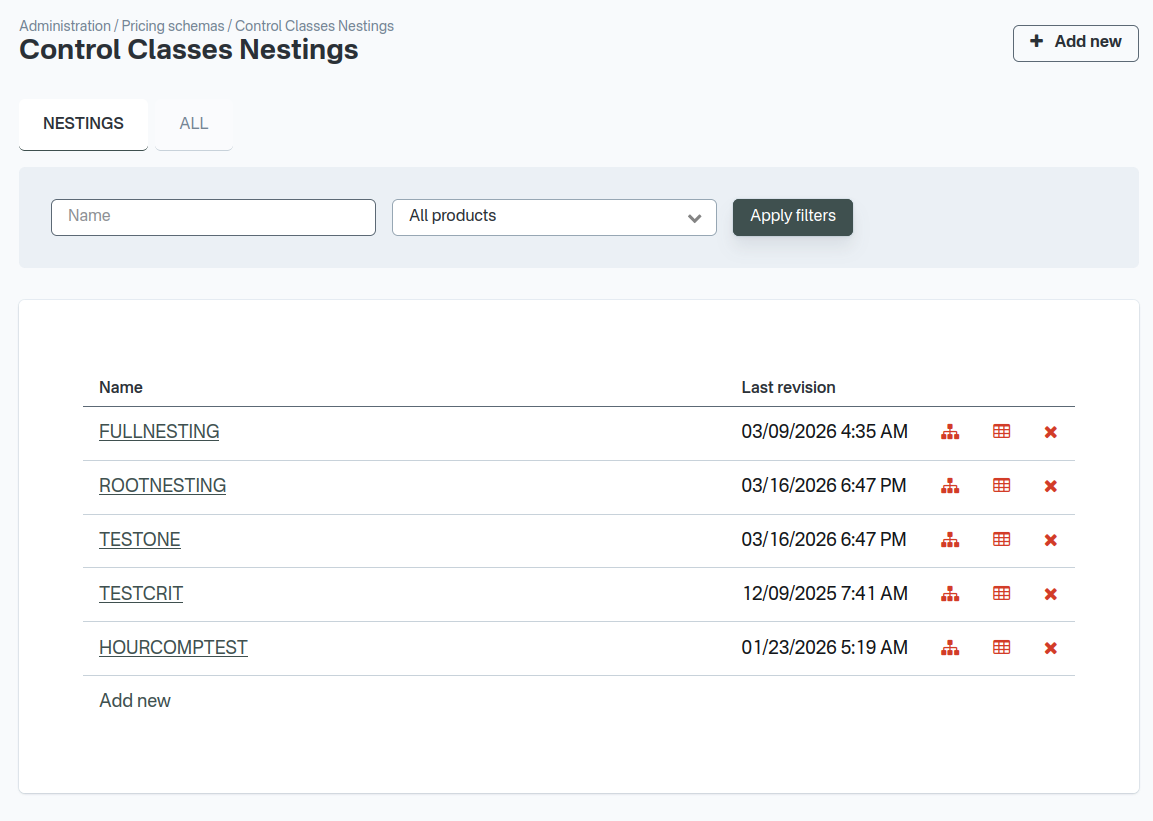
The list view displays all Control Classes for the account, organized in two tabs:
- Nestings: shows only Nestings classes (tree roots).
- All: shows all classes regardless of their position in the tree.
Classes can be filtered by name and product. Each entry shows the class name and last revision date. Action icons allow navigating to the tree view, viewing authorizations (when the RMS integration is enabled and the account's Child Selection Criteria is set to Sales Authorizations Availability), cloning the nesting, or deleting the class.
A Root class cannot be deleted if it has children.
Create and Edit
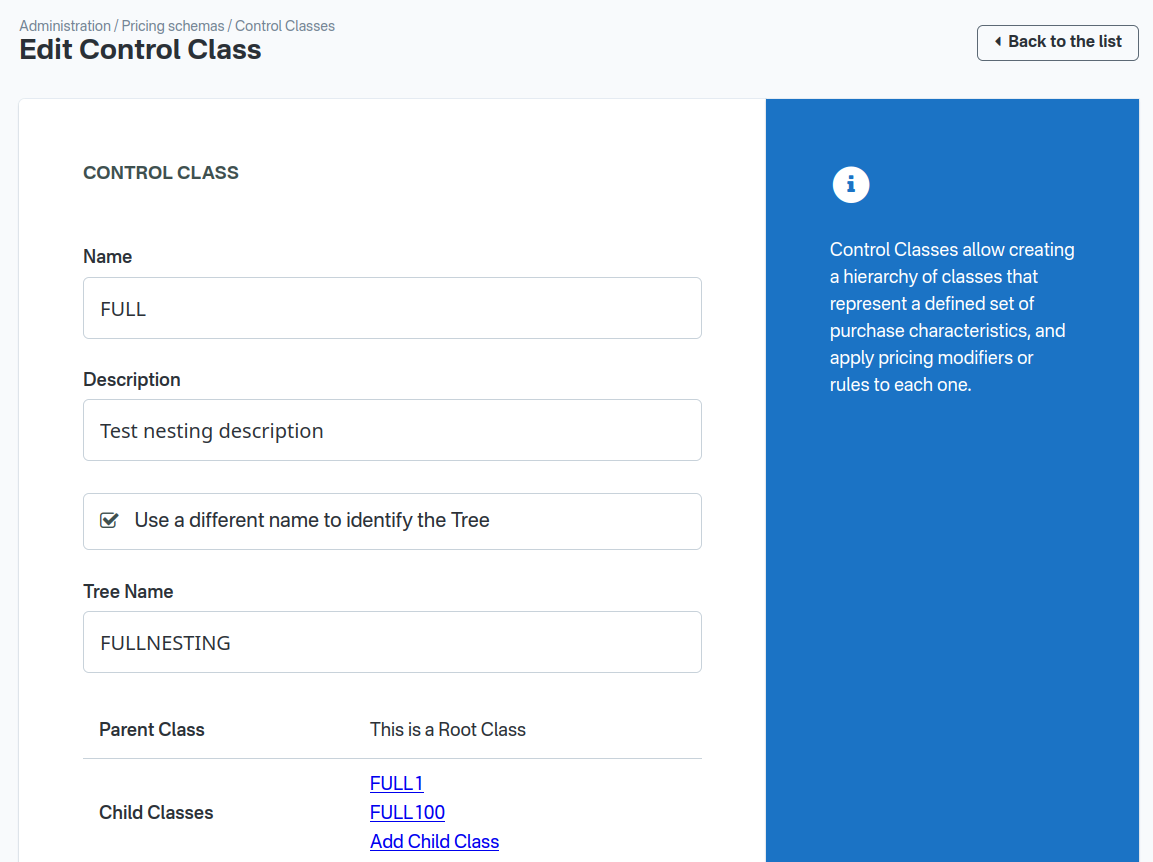
The details form allows creating or editing a Control Class. The form includes:
- Name: the class name. Uniqueness rules depend on the account's Naming Policy.
- Description: an optional description.
- Tree Context: displays the class's position in the hierarchy — its Root, parent, siblings, and children.
- Products (Root only): one or more products this nesting is associated with. Only products with Journey Pricing or Market Pricing are available. At least one product is required.
- Nesting Name (Root only): an optional display name for the entire nesting.
- Independent Availability by Seat Class (Root only): when the account's Child Selection Criteria is Sales Authorizations Availability, enables separate availability tracking per seat class sub-nesting. Direct children must then vary on Seat Class with match type One Of. This option is only available when the Root has no children, or when all existing direct children already vary on Seat Class.
- Compounding Price Modifiers (Root only): when the account's Child Selection Criteria is Most Specific, applies every price modifier along the path from the Root to the selected class instead of only the selected class's modifier. See Compounding Price Modifiers.
- Characteristics: the purchase characteristics that determine when this class applies. Each characteristic is configured with a match type and values. When the Root has Independent Availability by Seat Class enabled, direct children of the Root are required to configure Seat Class with match type One Of.
- Price Adjustment (non-Root only): the modifier type (percentage or fixed amount) and value to apply on top of the base price.
- Schedule Assignment (Root only): allows assigning one or more schedules to the Root class, enabling Control Class logic for trips running on those schedules. Schedules can be assigned individually or in bulk.
View Authorizations
The authorizations view will only become available when the account's Child Selection Criteria is set to Sales Authorizations Availability in the Control Classes Settings page.
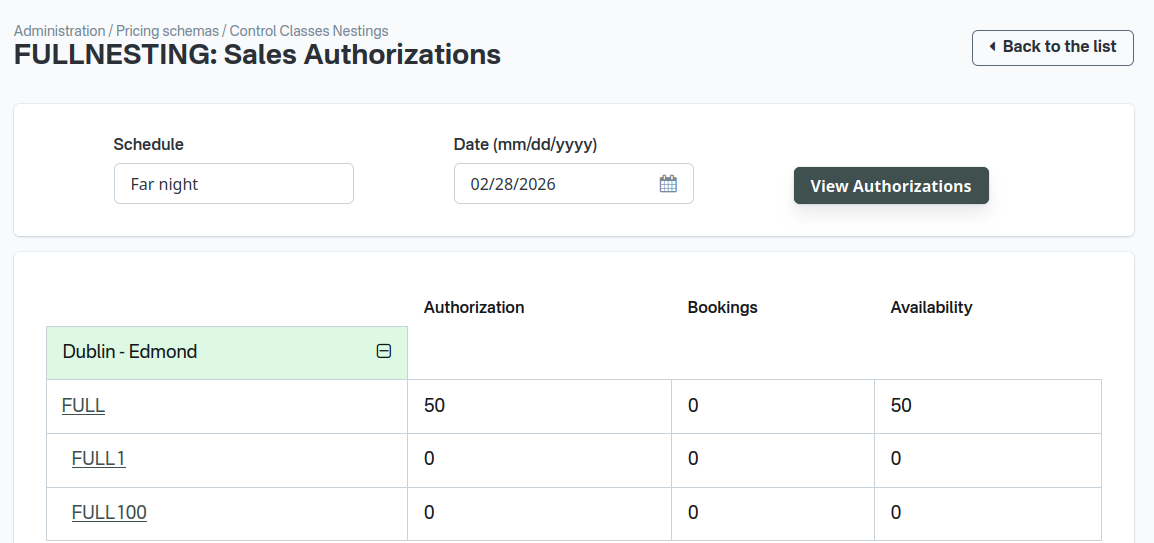
The authorizations view displays the current RMS authorizations for a Control Class Nesting. The operator selects a schedule and manifest date, and the system shows an authorization table organized by:
- Rows: Origin-Destination pairs (legs).
- Columns: All Control Classes in the tree.
For each cell (O&D pair + Control Class), the table displays:
- Authorization: the number of tickets authorized by the RMS.
- Bookings: the number of tickets already sold.
- Availability: the remaining tickets available for sale.
Sales Flow behavior
The Control Class selected for a certain purchase can modify how that purchase interacts with the sales flow.
Stop selling when availability reaches zero
This option is only available when the account's Child Selection Criteria is Sales Authorizations Availability.
When a class matches a purchase, but it's calculated availability reaches zero, by default the parent class will be evaluated and selected instead.
With this option, when the class runs out of availability, the parent will not be selected. The class without availability will be selected instead, resulting in that purchase becoming unavailable in the trips result page.
For example:
- A trip search from A to B has two results: from A to B with Manifest A with Fare Class X, and from A to B with Manifest A with Fare Class Y.
- For each trip result, a Control Class must be selected.
- Considering a simple nesting assigned to Manifest A, with a ROOT with two children: CC1 for Fare Class X, and CC2 for Fare Class Y,
- and A to B for CC1 has availability 10, but A to B for CC2 has availability 0.
Default behavior:
- The trip result for Fare Class X will be assigned CC1
- The trip result for Fare Class Y will be assigned ROOT, because CC2 has no availability, so the parent is selected
- Both trip results will appear selectable in the trip search page
- This might be undesirable: we don't want Fare Class Y to continue selling after the authorized sales have been sold, at the ROOT discount, we want it to "stop selling".
Behavior if CC2 has enabled "Stop selling when availability reaches zero":
- The trip result for Fare Class X will be assigned CC1
- The trip result for Fare Class Y will be assigned CC2, with availability zero
- Only the first trip result will appear in the trip search page, the second one was filtered out because it doesn't have enough availability